


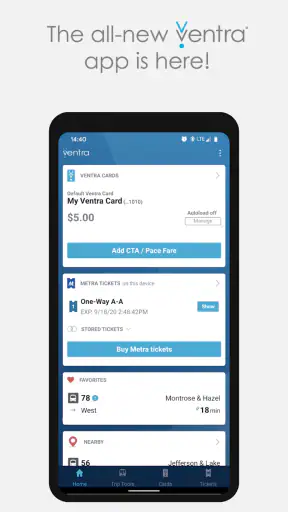
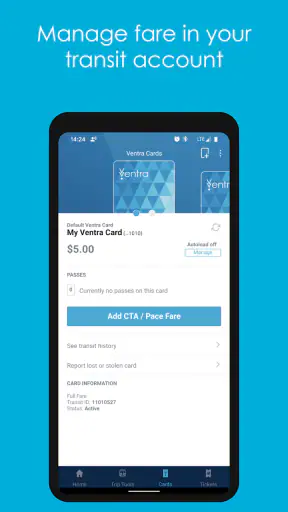
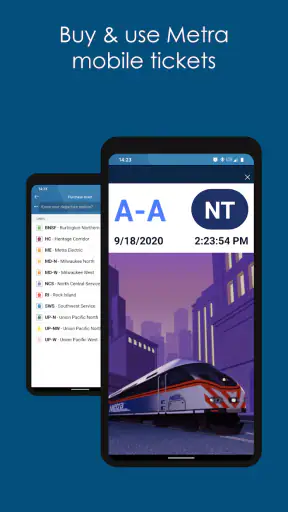
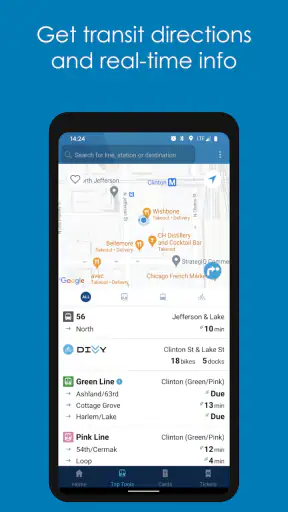
Ventra is the kind of app I appreciate most when I am already standing at a station and need to make a quick decision. Developed by the Chicago Transit Authority, it brings fare management and transit information for CTA, Metra, and Pace into one mobile tool. Its main appeal is not that it tries to replace every navigation service on a phone; it is that it puts the practical part of riding Chicago-area public transportation—paying, handling tickets, and checking arrivals—closer to the moment when I need it.
I reviewed it as a free Maps & Navigation app, and my overall impression is mixed but useful. The central fare capability can simplify a trip, especially when I want to avoid searching for a vending machine or carrying a separate ticketing routine for different services. At the same time, the experience feels more functional than polished, and the average rating of 3.1 from around 6,600 ratings suggests that many riders have encountered frustrations. I would not dismiss it, though. For the right commuter, the ability to manage transit fares before boarding is the reason to keep Ventra installed.
Why mobile fare management is the app’s real strength
Most transit apps are strongest at showing routes, but route planning is only one part of a journey. I can find a train or bus path with a general mapping app and still be left wondering how I will pay, whether I need a separate ticket, or whether I should prepare before reaching the platform. Ventra focuses on that practical gap. It is designed around riding CTA, Metra, and Pace, with fare management, Metra ticket purchases, and arrival information gathered in the same place.
That focus changes the way I use it. Instead of treating the app as a broad city guide, I see it as a travel wallet and transit companion. Before a ride, I can use it to organize the payment side of the trip. During a journey, I can check arrival information without switching immediately to another service. The value is especially clear when a trip crosses between different Chicago-area transit options and I want one familiar place to handle the transportation details.
The app’s short store description is simply “Ventra,” but the fuller purpose is more practical: it supports the fare side of regional public transportation while also providing arrivals. That combination matters because the person checking when a vehicle comes may also be the person deciding whether to buy a ticket, prepare a fare, or change plans. Keeping those tasks together reduces the number of separate steps, even if it does not turn the whole transit experience into a seamless one.
I would be careful not to confuse this with a universal navigation replacement. A general maps app is usually better for comparing walking routes, driving options, landmarks, and destinations beyond the transit network. Ventra makes more sense when the journey is already centered on CTA, Metra, or Pace and the question is, “How do I ride and pay for this service?” rather than, “What is every possible way to get across the city?”
What the fare focus means for everyday riders
For a regular rider, the biggest benefit is preparation. I can deal with the fare before the most hectic part of the trip instead of waiting until I am in a line, near a crowded entrance, or trying to understand a machine while other passengers move around me. That is a small improvement, but small improvements matter when they happen every weekday.
Metra riders may find the focus particularly useful because buying a ticket is more deliberate than simply checking a nearby bus. A commuter can think about the trip before leaving home, then use the same transit-oriented app for arrival information. I like that workflow because it separates planning from rushing: first I handle the ticket, then I check the service timing, and finally I travel.
There is also a useful distinction between checking arrival information and buying a ticket. I do not have to treat them as one task. If I already know how I am paying, the app can serve as a quick arrival reference. If I am preparing for a Metra trip, the purchase function becomes more important than the arrival screen. This makes the app more flexible than a tool built around only one moment of the journey.
How I would use it before leaving home
My preferred routine would be to open Ventra before heading out, identify the service I expect to use, and take care of the fare-related work while I still have time to correct a mistake. I would then check arrivals closer to departure rather than relying on an old glance. That two-stage workflow is more dependable than trying to perform every action at the station entrance.
I would also keep the app updated before an important trip. The current version is 2.2.16, and the minimum operating system is Android 7.0. Those details matter for anyone using an older device, particularly a phone that has not received recent system updates. A transit app is not much help if it cannot be installed or opened when a journey begins, so compatibility is worth checking before depending on it.
Another practical habit is to think through the payment need before opening the app. If I am taking a simple CTA ride, I may mainly want fare access or arrivals. If the trip involves Metra, I would give myself more time because ticket purchasing is a more consequential step than merely looking up the next vehicle. This is not about making the process complicated; it is about avoiding the mistake of treating every transit trip as equally quick to prepare.
How Ventra feels in practice
The app’s usefulness depends on whether its focused tools match the trip I am taking. When they do, the experience is direct: I can stay inside a transit-specific environment instead of jumping between a map, a ticketing process, and an arrival lookup. When they do not, the limitations become more visible because Ventra is not trying to be a complete travel planner.
I found the fare capability most valuable when I wanted to make a decision before arriving at the station. Mobile access changes the timing of the task. Rather than treating payment as something that begins only at the gate or platform, I can prepare earlier. That reduces one source of uncertainty, especially for someone unfamiliar with the system or someone traveling at a busy time.
The experience is less impressive if I expect every screen to behave like a modern, highly refined consumer app. The rating of 3.1, based on around 3,700 written reviews, is a reminder that practical importance does not automatically mean flawless execution. I would approach Ventra as a useful official transit tool that may require patience, not as a perfectly smooth app that removes every possible point of friction.
That distinction is important for new riders. An official app can be valuable because it is tied to the transportation services it supports, but official status does not guarantee that every interaction will feel effortless. I would install it before a first trip, explore the fare and ticket areas calmly, and avoid making the first attempt during the few minutes before a departure. That preparation gives me a chance to understand the workflow without pressure.
A realistic commute scenario
Imagine I am leaving for a weekday appointment and need to combine a local connection with a Metra journey. A general maps app can help me understand the route, but it may not be the place where I want to handle the Metra ticket. Ventra gives me a transit-specific starting point: I can prepare the ticket, then check the relevant arrival information as departure approaches.
The advantage is not merely having fewer apps on the screen. It is reducing the mental switching between “Where do I go?” and “How do I pay?” I can use a mapping service for the broad route if necessary, then return to Ventra for the transportation transaction and timing. That division of labor feels realistic. Ventra does not need to do everything to be useful; it needs to do the fare-related part reliably enough to support the journey.
If the appointment is important, I would still leave extra time. The app can help me prepare, but it cannot remove delays, crowds, a low phone battery, or the consequences of selecting the wrong service. I would treat mobile ticketing as a convenience and a planning aid, not as a reason to cut the trip close. The best benefit comes when I use the app before urgency takes over.
Where it differs from the usual alternatives
Google Maps and Apple Maps are better choices when I need broad route discovery, walking directions, address search, or comparisons across many types of transportation. They are familiar and often excellent for the first question: how do I get there? Ventra answers a narrower question: how do I manage the fare and transit details for the CTA, Metra, and Pace services I am using?
A dedicated Metra-oriented workflow may feel more focused for someone who almost never uses CTA or Pace. On the other hand, a rider who moves between those services may prefer Ventra because it keeps the regional transit relationship in one app. The trade-off is specialization. Ventra is more relevant than a general map when payment is the problem, but less complete when the entire journey involves several unrelated planning needs.
I would not install it expecting a social travel experience, sightseeing guide, or a replacement for every transportation tool on my phone. Its value comes from being close to the fare transaction. That makes it a companion app rather than an all-purpose travel command center.
The trade-offs I would consider before relying on it
The first trade-off is convenience versus dependence on the phone. Mobile fare management is easier than handling everything manually, but it also makes the phone part of the travel process. I would keep the device charged and avoid waiting until the last second to prepare a ticket. Anyone uncomfortable with phone-based payment or who prefers a physical backup may find the app less appealing as a primary method.
The second is breadth versus focus. Ventra covers the services that matter to its audience, but someone planning a trip outside CTA, Metra, and Pace will still need another tool. Even within Chicago, a broader map may be better for understanding the walking portion, finding an unfamiliar entrance, or comparing a transit route with other options. I see this as a reason to use Ventra alongside a map, not necessarily instead of one.
The third trade-off is official relevance versus user experience. An app from the Chicago Transit Authority has a clear connection to local transit, which is reassuring when the task is fare management for the supported network. Yet the modest average rating shows that relevance alone is not enough for every user. I would judge it by the specific task I need: if I regularly need Ventra’s fare and ticket functions, the practical value may outweigh interface frustrations; if I only need occasional route advice, another app may feel easier.
There is also a learning curve for visitors. A local rider may already understand which service they are taking and what kind of fare transaction is appropriate. A visitor may not. I would not rely on the app alone to teach me the entire Chicago transit system in a hurry. I would first identify whether the trip is CTA, Metra, Pace, or a combination, then use Ventra for the matching task. That simple classification prevents much of the confusion that comes from opening the app without a clear purpose.
Small habits that make the app more dependable
- Prepare before the station: I would handle a Metra ticket while I have time and connectivity, rather than beginning the purchase at the exact moment boarding is approaching.
- Separate planning from checking: I would use a broad map for the full route, then use Ventra specifically for fare work and arrival information.
- Confirm the service: Before paying, I would make sure I am working with the intended CTA, Metra, or Pace journey instead of assuming every trip uses the same process.
- Keep a practical backup: For an important appointment, I would not let a single phone-based workflow be my only preparation. Extra time and a charged device are sensible safeguards.
These habits are more important than they may sound. The app’s strongest feature is useful precisely because it moves a potentially stressful task earlier in the journey. If I wait until the platform, I lose much of that benefit. If I prepare in advance, I give the app a fair chance to make the trip calmer.
Who will get the most from Ventra?
Regular Chicago-area riders are the clearest audience. If I frequently use CTA, Metra, or Pace and want mobile access to fares, Metra tickets, and arrivals, Ventra has a practical role on my phone. The free price also lowers the barrier to trying it, and its Everyone content rating makes it suitable for a broad range of riders. Its install count of over one million shows that it has reached a substantial transit audience, although popularity by itself does not guarantee that it will fit every commute.
Metra passengers who want to buy tickets before reaching the station may gain the most noticeable benefit. The app is also useful for people who combine services and dislike keeping separate fare routines in their head. For these riders, the app’s focused coverage can be more valuable than a prettier but less transaction-oriented map.
Visitors can benefit too, but I would recommend using it with a general navigation app rather than alone. Ventra can help with the transit-specific part of the trip, while a map can explain the surrounding streets and walking connections. This combination is more realistic than expecting one app to handle every unfamiliar detail.
I would skip it if I rarely use the supported Chicago services and only want general directions. In that case, installing another app solely to check a route may add clutter without solving a real problem. I would also hesitate to make it my only travel tool if I strongly prefer physical fare methods, have an older incompatible phone, or need a broad planner that covers many transportation systems beyond its intended network.
My final take after using it
Ventra succeeds when I judge it by its central purpose: making the fare side of CTA, Metra, and Pace trips more manageable from a phone. The ability to prepare a Metra ticket, handle transit fare tasks, and check arrivals in the same transit-focused app can remove a real point of friction from a commute. I especially like the idea of completing the transaction before reaching the station, when I am less rushed and more able to check what I am doing.
It is not the best choice for broad navigation, and I would not pretend that the moderate rating is irrelevant. The app may feel less polished than the mapping tools many riders already use, and newcomers may need to understand their service before the fare workflow makes sense. Those are meaningful limitations, not reasons to ignore its useful role.
My recommendation is simple: if you ride CTA, Metra, or Pace often, install Ventra and learn its fare workflow before your next important trip. Use a general map for the larger route, use Ventra for the transit transaction and arrivals, and give yourself time the first few times. For occasional visitors or people who only need directions, another navigation app may be the better everyday choice. For Chicago-area commuters who want to move fare preparation off the platform and into their pre-trip routine, Ventra is a worthwhile free tool despite its rough edges.


